


Concept by Jenny Brozek at Artstation www.artstation.com/jennybrozek. I really love the design and I was so inspired to build this 3D model. This is a great opportunity to test out my modeling and texturing skills.
Dragon Blacksmith

Base Sculpt in Zbrush
Start with digital sculpting in Zbrush. Using Marvelous Designer for his cloth and imported into Zbrush for more details.
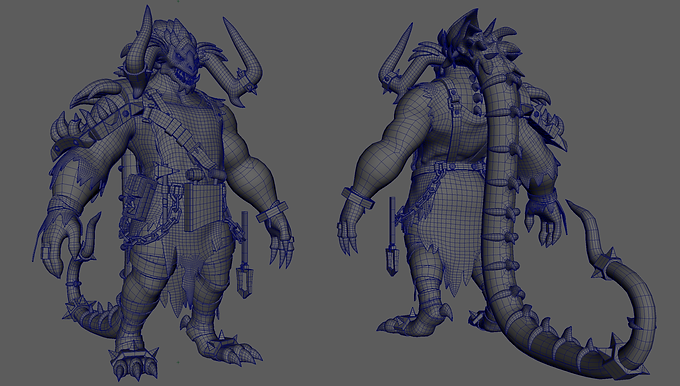
Retopology
Worked on retopology of character in Maya, and did some adjustments of the shape.

Adding Details in Zbrush
Put the clean mesh into Zbrush to add more details. Adding stylized fire behind the head.

Character Texturing
Layout UV in Maya. Import low poly and high poly models into Substance Painter to work on texture.

Pose the character
Import low poly character, pet dragon, and weapon models into Zbrush for posing.

Environment set up
Built a simply environment for this character. environment concept art by Byung Cheol.

Lighting and rendering in Maya
Set up lights in Maya, and render for later editing.
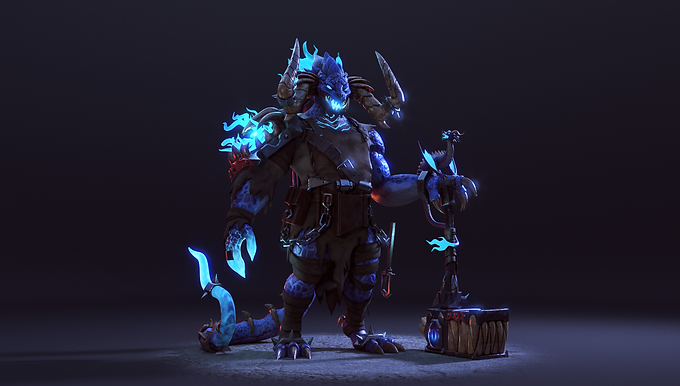
Turntable setup
Render a turntable for clear reading of this character.

Pet Dragon Modeling
Modeling base mesh of the pet dragon in Maya, keep the tail posed to save some time later on.

Pet Dragon Sculpt in Zbrush
Bring it to ZBrush to do some adjustment and adding details on the base mesh.
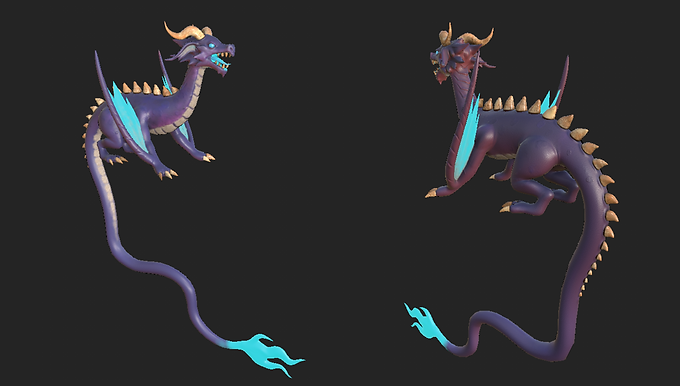
Pet Dragon Texture
Using Substance Painter to bake different maps, and start creating materials for the dragon.

Weapon Modeling
Modeling base mesh in Maya.

Weapon Sculpt in Zbrush
Adding details in Zbrush.

Weapon Texture
Bake Maps in Substance Painter, and add different materials to different parts. Set up eyeballs Textures in Maya later.

Render without Fog
Maya render without fog.

Render with Fog
Maya render with fog.

Look Development in Nuke
Adding VFX to make the render look more a live.